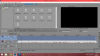
Yes as you can see from this screenshot, they are AVI files
View attachment 29373
Its a Vivitar DVR Video RecorderWhat camera is it? I'm guessing Windows has the codec but Vegas isn't loading it, I might be able to suggest a codec that will work.
Its a Vivitar DVR Video Recorder
I used the programme and found it has an MPJEG codec, I looked online and found a download and installed it, but all that it has done is change the screen from black to green :/I could not find what codec it uses, I recommend you download GSpot 2.70, it allows you to see what codec a video file uses, then from there you can see if downloading the codec works.

But you might want to try some more lighting for your background, it comes off very dark in contrast to you 
I tried it :/ didn't work, I can't find any solutions to this problem :/ I've tried everything but nothing will workMaybe if you load your file in windows live movie maker you can save it under a different format? But this would not be a solution to do every time again...[DOUBLEPOST=1434626545,1434626313][/DOUBLEPOST]And can I give you a tip? you don't have to do thisBut you might want to try some more lighting for your background, it comes off very dark in contrast to you
![]()

I'm sorry, I don't know how to help you...I tried it :/ didn't work, I can't find any solutions to this problem :/ I've tried everything but nothing will work
And thankyou for the advice. I'm thinking of saving up for proper lights instead of using the window.